Player Management
How to read who is playing, react when the roster changes, and ask the OS to add, replace, or reset players. The session model is the same across all three SDKs: the roster is owned by the OS, not the game. Your game reads the roster and asks the OS to change it; it never silently adds or removes players. This guide covers the shared model and shows the per-engine API side by side.
New to Board’s player model? Read Players & Sessions for how profiles, guests, and AI players fit together, and Profile Switcher for the OS overlay that swaps the active profile.
The session model
A Board session is the set of players currently in your game. Every SDK exposes the same logical pieces:
| Concept | Meaning |
|---|---|
| session roster | The list of players in the game right now (one or more) |
| active profile | The system-wide Board profile that owns the device, distinct from the roster |
| player | One participant: a Profile, a Guest, or an AI player |
| player id | Persistent, app-specific identifier for a Profile, stable across sessions and reboots |
| session id | Identifier valid only for the current session, used to target a specific player |
At launch the roster contains the active profile. The session always requires at least one Profile player. This constraint is enforced by the OS and cannot be bypassed: the OS selector hides the “remove” and “guest” options when only one Profile remains.
Player types
| Type | Meaning |
|---|---|
| Profile | A persistent Board identity (name, avatar, durable id) |
| Guest | A temporary player that exists only for the current session |
| AI | A game-controlled player chosen from the AI types your game registers |
The OS owns the roster: players are added, replaced, or reset only through the OS selector overlay or a reset call. A game cannot mutate who is playing on its own.
Per-SDK difference in how AI surfaces. Unity and Web expose a distinct
AIplayer type, so an AI player reports an AI type and carries the index of the registered AI type it was created from. Godot’s player type enum is only Profile and Guest: AI players come back tagged as Profile or Guest, and you match them by the name you registered. The AI players section forks on this.
Player id vs session id
- player id is durable. Use it for save game associations, long-term per-player state (high scores, unlocks, preferences), and cross-session identity. Guests get a fresh, random player id every session, so never persist data keyed by a Guest’s player id.
- session id is ephemeral. Use it for in-game state during the current match and to target a specific player when asking the OS to replace one. Do not persist it: it has no meaning across launches.
When loading a save game whose original profile no longer exists, the OS replaces it with a Guest. The Guest inherits the original session id but receives a new player id, preserving in-game state keyed by session id while breaking persistent associations.
Reading the roster
Every SDK exposes the current players and a count. The shapes differ per engine, but the fields carry the same meaning: a player id, a session id, a display name, a type, and an avatar id.
using Board.Session;

// All players in the current session.
BoardSessionPlayer[] players = BoardSession.players;

foreach (var player in players)
{
    Debug.Log($"{player.name}: playerId={player.playerId} sessionId={player.sessionId}");
}
import { Board } from "@board.fun/web-sdk";

if (Board.isOnDevice) {
  const players = Board.session.getPlayers();
  const count = Board.session.getPlayerCount();
  for (const p of players) {
    console.log(`${p.name}: playerId=${p.playerId} sessionId=${p.sessionId}`);
  }
}
if Board.is_on_device:
    var players: Array[BoardPlayer] = Board.session.get_players()
    var count: int = Board.session.get_player_count()
    for p in players:
        print("%s: player_id=%s session_id=%d" % [
            p.display_name, p.player_id, p.session_id])
Player fields
The field names follow each engine’s naming convention, but they map one to one:
| Meaning | Unity | Godot | Web |
|---|---|---|---|
| display name | name |
display_name |
name |
| persistent player id | playerId |
player_id |
playerId |
| session id | sessionId |
session_id |
sessionId |
| type | type (BoardPlayerType) |
type (BoardPlayer.Type) |
type (BoardPlayerType) |
| avatar id | avatarId (string) |
avatar_id (String) |
avatarId (string) |
| AI type index | aiTypeIndex (-1 if not AI) |
not on BoardPlayer |
aiTypeIndex (present only when AI) |
Branching on player type
using Board.Core;
using Board.Session;

foreach (var player in BoardSession.players)
{
    switch (player.type)
    {
        case BoardPlayerType.Profile:
            // Persistent identity stored on Board
            break;
        case BoardPlayerType.Guest:
            // Temporary player for this session only
            break;
        case BoardPlayerType.AI:
            // Game-controlled AI player
            break;
    }
}
import { Board, BoardPlayerType } from "@board.fun/web-sdk";

for (const p of Board.session.getPlayers()) {
  switch (p.type) {
    case BoardPlayerType.Profile:
      // Persistent identity stored on Board
      break;
    case BoardPlayerType.Guest:
      // Temporary player for this session only
      break;
    case BoardPlayerType.AI:
      // Game-controlled AI player
      break;
  }
}
# Godot's BoardPlayer.Type is only PROFILE or GUEST. Use the helpers.
for p in Board.session.get_players():
    if p.is_profile():
        # Persistent Board profile
        pass
    elif p.is_guest():
        # Temporary session-only player
        pass
The active profile
Distinct from the roster is the system-wide active profile: the Board identity that owns the device right now. The active profile is one specific player; the roster is the full list of who is playing your game. Use the active profile to surface “your saves” by default, greet the player on the title screen, or decide which progression state to load. The active profile may or may not appear in the roster.
using Board.Core;
using Board.Session;

BoardPlayer activeProfile = BoardSession.activeProfile; // null if none

// React when the active profile changes.
BoardSession.activeProfileChanged += OnActiveProfileChanged;
const profile = Board.session.getActiveProfile(); // null if none
if (profile) {
  console.log("Active:", profile.name);
}
var active: BoardPlayer = Board.session.get_active_profile() # null if none
print("active profile: %s" % (active.display_name if active != null else "(none)"))

# In Godot the active profile change is folded into players_changed;
# re-read get_active_profile() when that fires.
Reacting to roster changes
This is the biggest paradigm difference between the SDKs. Unity raises a C# event. Godot emits a signal. Web has no roster event at all: you re-read the roster after a selector call resolves.
using Board.Session;

void Start()
{
    BoardSession.playersChanged += OnPlayersChanged;
}

void OnDestroy()
{
    BoardSession.playersChanged -= OnPlayersChanged;
}

void OnPlayersChanged()
{
    // Re-read BoardSession.players and refresh your UI / game state.
    RefreshPlayerDisplay();
    ValidateGameState();
}
// The Web SDK has NO players-changed event. Re-read the roster after a
// selector call resolves (see "Adding players" below).
async function refreshRoster() {
  const players = Board.session.getPlayers();
  renderPlayerList(players);
}
func _ready() -> void:
    if not Board.is_on_device:
        return
    Board.session.players_changed.connect(_on_players_changed)

func _on_players_changed() -> void:
    # The signal carries no payload; re-query get_players().
    var players: Array[BoardPlayer] = Board.session.get_players()
    _refresh_ui(players)
    _validate_game_state(players)
The Web SDK does not expose a roster-changed callback. Because the only ways the roster mutates are the OS selector and reset (all driven by your own calls), re-reading getPlayers() immediately after those calls resolve is sufficient.
Session readiness
On Godot and Web the session manager binds to OS services asynchronously, so the roster can read empty for a moment after startup even though a profile is active. Wait for both readiness checks before treating an empty roster as authoritative.
Unity has no separate readiness call. Its roster is populated by an internal poller and surfaced through
playersChanged, so you subscribe to that event rather than gating on a readiness flag.
// areServicesReady() is the right runtime gate (not the SDK version).
function rosterIfReady() {
  if (Board.session.isReady() && Board.session.areServicesReady()) {
    return Board.session.getPlayers();
  }
  return [];
}
func _ready() -> void:
    if not Board.is_on_device:
        return
    Board.initialize("00000000-0000-0000-0000-000000000000")
    await _wait_for_session()
    _render_player_list()

func _wait_for_session() -> void:
    while not (Board.session.is_session_ready() and Board.session.are_services_ready()):
        await get_tree().process_frame
Loading avatars
Each player carries an avatar id. How you turn that into a displayable image differs per engine: Unity surfaces the avatar texture directly on the player object and loads it lazily; Godot and Web load it through the avatar module, passing the avatar id (coerced to a number).
using Board.Core;
using Board.Session;

void DisplayPlayer(BoardSessionPlayer player)
{
    // avatar lazy-loads on first access; may be null until ready.
    playerImage.texture = player.avatar;
    player.avatarLoaded += OnAvatarLoaded;
}

void OnAvatarLoaded(BoardPlayer player)
{
    playerImage.texture = player.avatar;
}

// For players not in the session (e.g. save-game UI), use the default avatar.
async void ShowDefault()
{
    Texture2D defaultAvatar = await BoardPlayer.GetDefaultAvatar();
    unknownPlayerImage.texture = defaultAvatar;
}
// forPlayer coerces the string avatarId to a number internally.
// All avatar loads resolve a PNG data URI.
async function loadAvatar(player) {
  const dataUri = await Board.avatar.forPlayer(player);
  imgElement.src = dataUri;
}

async function showDefault() {
  imgElement.src = await Board.avatar.getDefault(); // default = id 0
}
# avatar_id is a String on BoardPlayer; the loader takes an int.
func _load_avatar_for(player: BoardPlayer) -> ImageTexture:
    var tex := await Board.avatar.await_load_avatar(int(player.avatar_id))
    if tex == null:
        tex = await Board.avatar.await_default_avatar() # default = id 0
    return tex
Avatars are cached after the first load, and concurrent loads of the same id coalesce into a single fetch, so you can call these freely from your render path. Godot and Web expose a clear_cache() / clearCache() to drop the decoded textures if you need the memory back.
Adding players
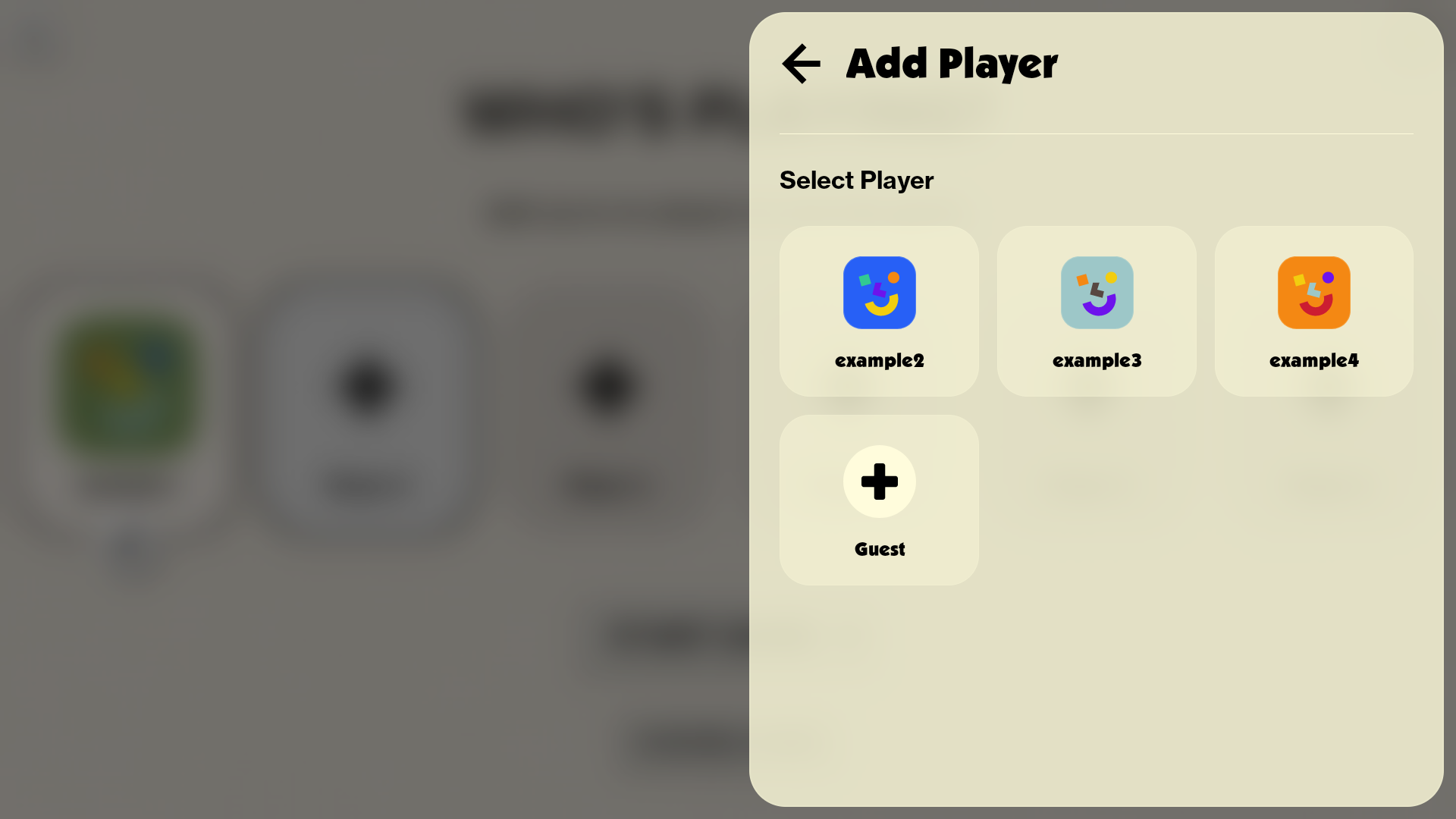
The roster is OS-owned, so a game brings in a new player only by opening the OS selector overlay. The user picks a Profile, a Guest, or an AI type from the picker, and the selection lands back in your game. How the result is delivered is the per-engine difference: Unity awaits a Task<bool>, Web awaits a Promise<boolean>, and Godot returns a request id and emits a completion signal.
using System;
using Board.Session;

public async void OnAddPlayerButtonPressed()
{
    try
    {
        bool added = await BoardSession.PresentAddPlayerSelector();
        if (added)
        {
            // playersChanged also fires with the updated list.
            Debug.Log("New player added to session");
        }
        else
        {
            Debug.Log("Player selector dismissed");
        }
    }
    catch (InvalidOperationException e)
    {
        Debug.LogError($"Failed to present player selector: {e.Message}");
    }
}
async function onAddPlayer() {
  const added = await Board.session.presentAddPlayer();
  if (added) {
    refreshRoster(); // no event; re-read after the promise resolves
  }
}
func _on_add_player_pressed() -> void:
    if not Board.is_on_device:
        return
    var rid: int = Board.session.present_add_player()
    if rid < 0:
        return  # selector already open, or off-device
    await Board.session.player_selector_finished
    _refresh_player_list()
Only one selector at a time. Opening a second selector while one is in flight fails. Unity throws an
InvalidOperationException; Godot returns-1and emitsplayer_selector_failed. Gate the buttons that open the selector while one is in flight.
Godot completion signals
Godot’s selector returns a request id immediately and reports the outcome on one of three signals. Use player_selector_finished when you do not need to distinguish a pick from a dismissal; use the other two to split the paths.
func _on_add_player_pressed() -> void:
    if not Board.is_on_device:
        return
    var rid: int = Board.session.present_add_player()
    if rid < 0:
        return

    # Split success / failure with one-shot connections.
    Board.session.player_selector_completed.connect(_on_added_ok, CONNECT_ONE_SHOT)
    Board.session.player_selector_failed.connect(_on_added_failed, CONNECT_ONE_SHOT)

func _on_added_ok(rid: int) -> void:
    _refresh_player_list()

func _on_added_failed(rid: int, reason: String) -> void:
    push_warning("[session] player selector failed: %s" % reason) # reason == "dismissed" on cancel
Adding a guest
A Guest is an anonymous, session-only player. On Unity and Godot there is no direct “add guest” call: the user picks “Guest” in the OS selector opened by the add-player flow above, and the new Guest appears in the roster with the OS allocating its session id. The Web SDK additionally exposes a direct addGuest(sessionId) that adds a Guest with the session id you supply, bypassing the selector.
// Web only: add a Guest directly with a caller-supplied session id.
Board.session.addGuest(nextSessionId);
refreshRoster();
Replacing a player
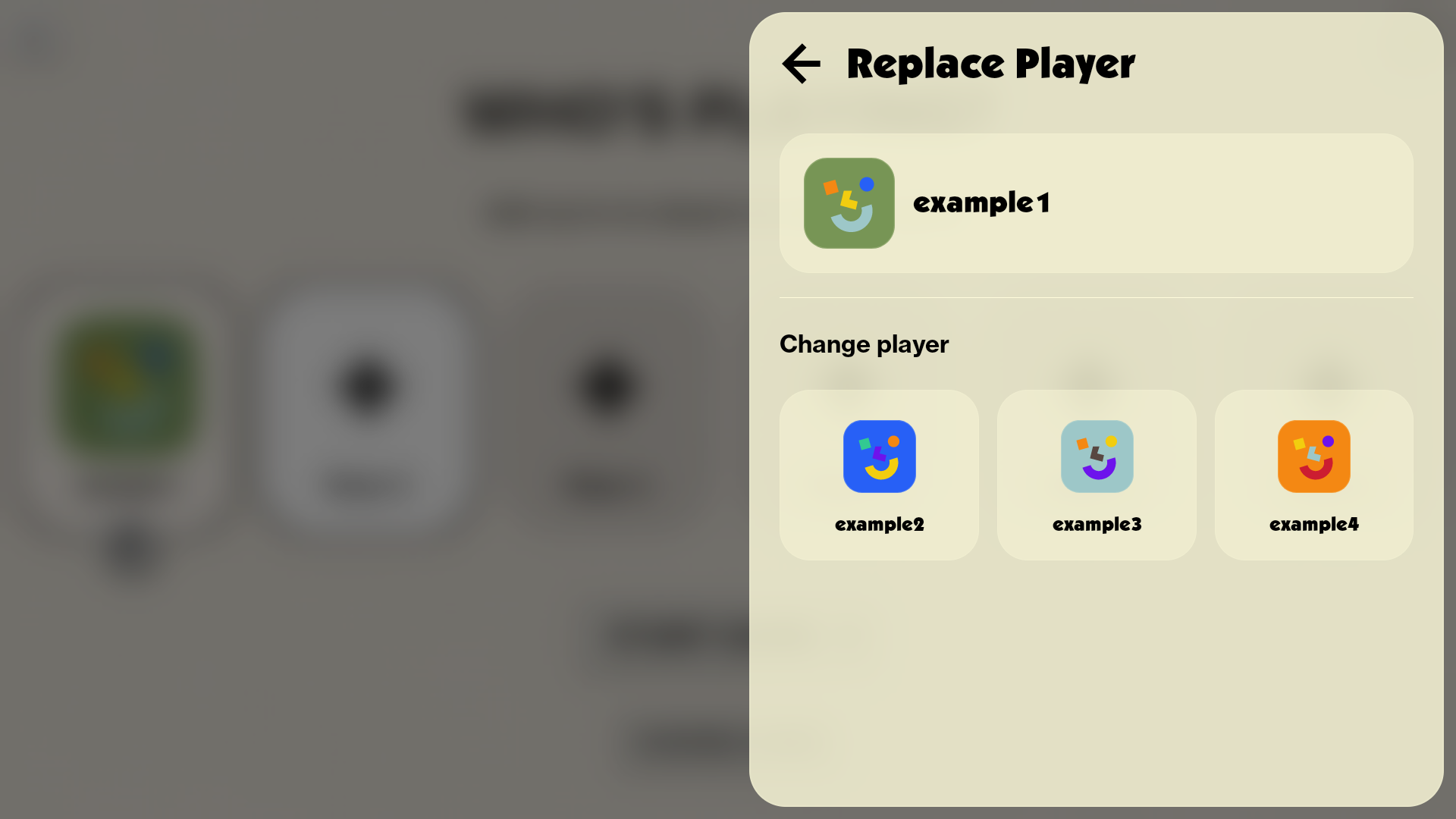
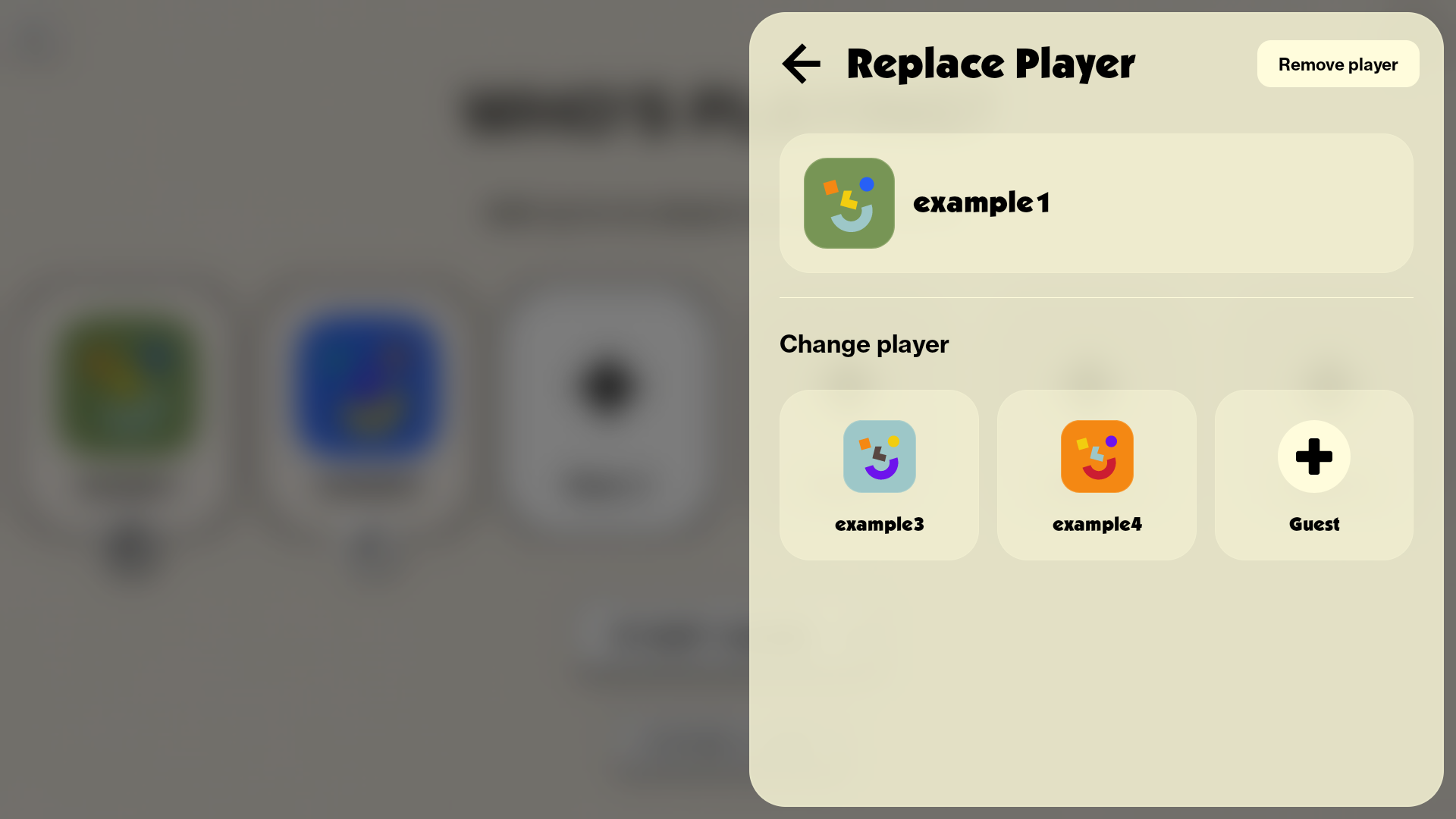
Replace targets one player by session id, opening the OS selector pre-configured to swap that slot. The user picks a different Profile or Guest, or dismisses to keep the current player.
using System;
using Board.Session;

public async void OnReplacePlayerPressed(BoardSessionPlayer player)
{
    try
    {
        bool replaced = await BoardSession.PresentReplacePlayerSelector(player);
        if (replaced)
        {
            Debug.Log("Player replaced or removed");
        }
    }
    catch (InvalidOperationException e)
    {
        Debug.LogError($"Failed to replace player: {e.Message}");
    }
}
async function onReplace(sessionId: number) {
  const replaced = await Board.session.presentReplacePlayer(sessionId);
  if (replaced) {
    refreshRoster();
  }
}
func _on_replace_pressed(session_id: int) -> void:
    if not Board.is_on_device:
        return
    var rid: int = Board.session.present_replace_player(session_id)
    if rid < 0:
        return
    await Board.session.player_selector_finished
    _refresh_player_list()
The replace selector adapts to the roster automatically. When replacing the only Profile in the session, the “Remove player” button and the Guest option are hidden: that player can only be replaced with another Profile. When there are multiple Profiles, “Remove player” appears and the Guest option is available alongside other Profiles. This is how the OS guarantees the session always keeps at least one Profile.
Removing a player
On Unity and Godot a game cannot remove a player directly: removal is OS-owned, surfaced through the replace selector (when more than one Profile is present) or cleared wholesale with a reset. The Web SDK additionally exposes a direct removePlayer(sessionId).
// Web only: remove a player directly by session id.
Board.session.removePlayer(sessionId);
refreshRoster();
AI players
The SDK provides the UI for users to add AI players and tells your game which AI type was chosen. It provides no AI logic: all decision-making lives in your game code. Register the AI difficulty levels or play styles your game supports, and the OS surfaces them in the selector’s “Add AI” tab alongside Profiles and Guests. Each AI type is a name plus an optional one-line description. Register a maximum of eight; if you register none, no AI option appears.
using Board.Session;

void Start()
{
    BoardSession.SetAIPlayerTypes(new BoardAIPlayerType[]
    {
        new BoardAIPlayerType { name = "Easy",   description = "Plays conservatively" },
        new BoardAIPlayerType { name = "Hard",   description = "Aggressive strategy" },
        new BoardAIPlayerType { name = "Master", description = "Expert-level play" },
    });
}
Board.session.setAIPlayerTypes([
  { name: "Easy",   description: "Plays conservatively" },
  { name: "Hard",   description: "Aggressive strategy" },
  { name: "Master", description: "Expert-level play" },
]);
func _ready() -> void:
    if not Board.is_on_device:
        return
    Board.initialize("00000000-0000-0000-0000-000000000000")
    Board.session.set_ai_player_types([
        { "name": "Easy",   "description": "Plays conservatively" },
        { "name": "Hard",   "description": "Aggressive strategy" },
        { "name": "Master", "description": "Expert-level play" },
    ])
Identifying an AI player in the roster
This is where the type model diverges. On Unity and Web an AI player reports the AI type and carries the index of the registered AI type it was created from, so you read that index to pick the matching behavior. On Godot the player type enum has no AI member: AI players come back as Profile or Guest, so you match them by the name you registered.
using Board.Core;
using Board.Session;

foreach (var player in BoardSession.players)
{
    if (player.type == BoardPlayerType.AI)
    {
        int typeIndex = player.aiTypeIndex; // 0 = Easy, 1 = Hard, 2 = Master
        ConfigureAiBehaviour(typeIndex);
    }
}
// For non-AI players, aiTypeIndex is -1.
import { Board, BoardPlayerType } from "@board.fun/web-sdk";

for (const p of Board.session.getPlayers()) {
  if (p.type === BoardPlayerType.AI) {
    const typeIndex = p.aiTypeIndex; // index into your registered AI types
    configureAiBehaviour(typeIndex);
  }
}
# Godot does not tag AI players as a distinct type; match by the name you
# registered with set_ai_player_types().
for p in Board.session.get_players():
    if p.display_name in ai_difficulty_names:
        _apply_ai_difficulty(p.display_name)
Filtering AI types in the selector
Both the add and replace selectors accept an optional list of AI type indices to restrict the “Add AI” tab to a subset of your registered types. An empty or omitted list offers all of them. This is useful when certain AI types should only be available in specific game modes. The indices correspond to the order you passed when registering.
// Show only the Easy and Hard options (indices 0 and 1).
await BoardSession.PresentAddPlayerSelector(new int[] { 0, 1 });

// Show all registered AI types (default).
await BoardSession.PresentAddPlayerSelector();
// Show only indices 0 and 1.
const added = await Board.session.presentAddPlayer([0, 1]);

// Show all registered AI types (default).
const addedAll = await Board.session.presentAddPlayer();
# Offer only the first and third registered AI types.
var rid: int = Board.session.present_add_player(PackedInt32Array([0, 2]))

# All registered AI types (default).
var all_rid: int = Board.session.present_add_player()
AI players in save games
AI players are stored in save game metadata like any other player. On Unity, when you load a save the resolved BoardSaveGamePlayer.aiTypeIndex preserves which AI type was active, so restore the matching behavior for that slot. On Godot, loading a save brings the AI player back into the roster tagged as Profile or Guest, so match it by the name you registered. See Save Games for the full save/load flow.
Resetting the session
Reset clears every Guest and AI player, leaving only the active Profile. It returns a boolean indicating success.
public void OnResetPlayersPressed()
{
    bool success = BoardSession.ResetPlayers();
    if (success)
    {
        Debug.Log("Players reset to initial state");
    }
}
function onReset() {
  const ok = Board.session.resetPlayers();
  if (ok) {
    refreshRoster();
  }
}
func _on_reset_pressed() -> void:
    if not Board.is_on_device:
        return
    var ok: bool = Board.session.reset_players()
    print("[session] reset returned %s" % ok)
On Godot,
reset_players()may not emitplayers_changedif the session is already at the reset state (nothing changed). Do notawait players_changedunconditionally after a reset; re-render immediately or use a short timer fallback.
Best practices
- Use the persistent player id for durable data, the session id for in-game state. Mixing them up breaks when a player rejoins later under a new session id.
- React through the right channel for your SDK. Subscribe to
playersChanged(Unity) orplayers_changed(Godot); on Web, re-read the roster after each selector or reset call resolves. - Treat Guests as ephemeral. Never key persistent data on a Guest’s player id: it is regenerated every session.
- Register AI types early, before presenting the selector, so the AI options are available from the start.
- Handle the empty roster gracefully. On Godot and Web the roster can read empty until services are ready, and every SDK reads empty off-device. Render an off-device or loading state rather than crashing.
See Also
- Players & Sessions — how profiles, guests, and AI players fit together
- Profile Switcher — the OS overlay for swapping the active profile
- Save Games — per-player save game associations
- Pause Menu — system pause screen integration
- Per-SDK API references: Unity, Godot, Web